
Download Downloads in Tab – Tab-based Download Management, Productivity, Utility
Overview
The mobile application Downloads in Tab is designed to streamline the management of file downloads within the Firefox browser environment. Its primary purpose is to enhance user experience by consolidating download tracking and control into a dedicated tab, eliminating the need for intrusive popup windows. This approach supports a cleaner, more organized browsing workflow, particularly beneficial for users who frequently download documents, media, or software from the web. The app addresses the common pain point of fragmented download tracking by centralizing all active and completed downloads in one accessible location.
Target users include Firefox users who prioritize efficiency, organization, and a modern browsing interface. This includes professionals managing multiple files, students downloading research materials, and casual users seeking a more intuitive download experience. The app aligns with current trends in browser design, mirroring functionality found in Chrome and Opera, which has made tab-based download management a standard expectation in modern web environments.
Although the developer did not provide additional technical details about the development background or team, the app has been available since 2011, indicating a long-standing presence in the Firefox ecosystem. Its continued relevance suggests consistent updates and user trust. The app’s importance lies in its ability to modernize Firefox’s default download interface, offering a utility that enhances productivity and user satisfaction without requiring significant changes to existing workflows.
Key Features & Functionality
Downloads in Tab offers a set of core functionalities aimed at improving download management through a tab-based interface. These features are designed to provide users with greater control, visibility, and customization over their download activities.
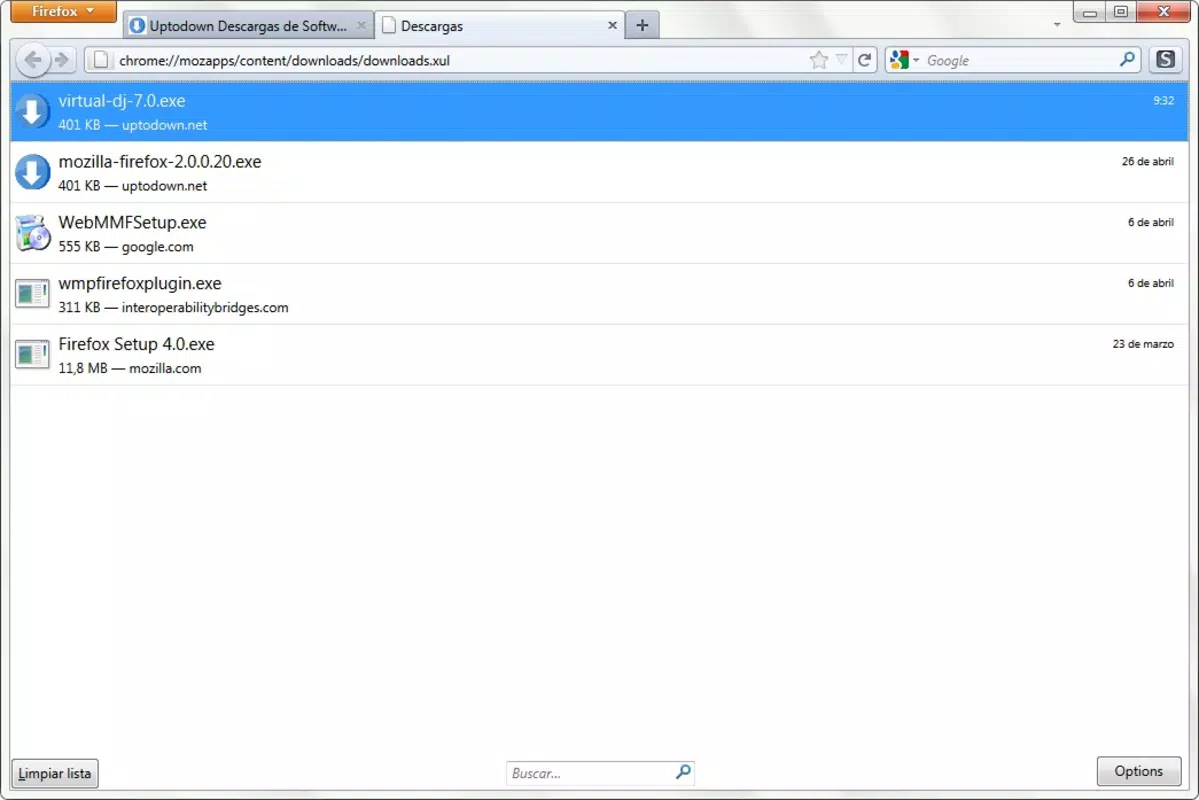
- Tab-Based Download Management: All downloads—active and completed—are displayed in a single, dedicated tab. This eliminates the need to monitor pop-up windows and allows users to access their download history without interrupting their current browsing session.
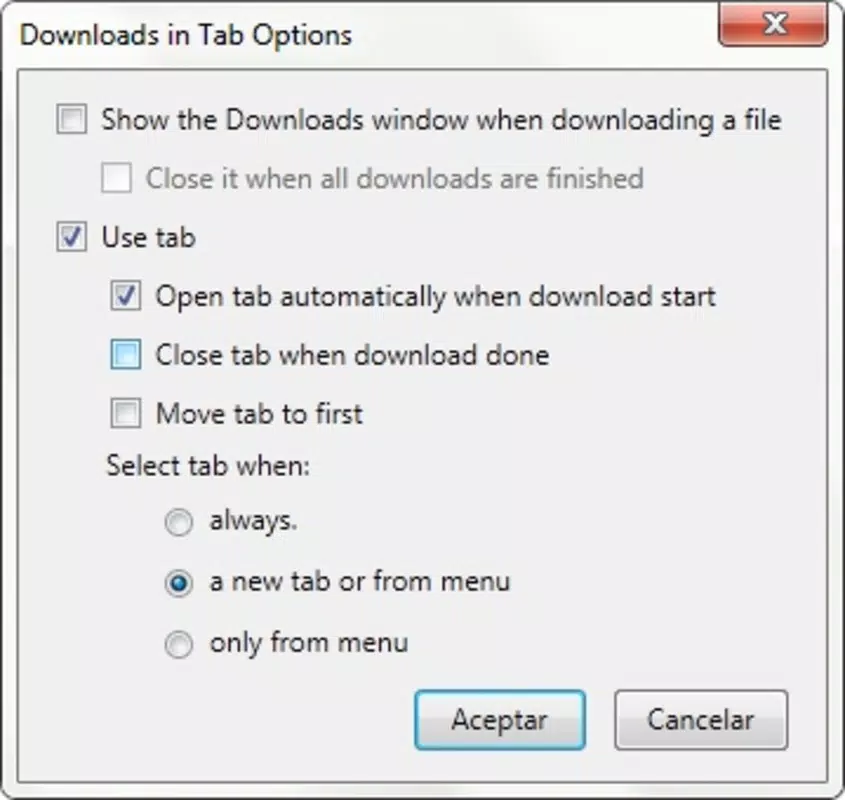
- Customizable Behavior Settings: Users can adjust how the download tab appears and behaves, including options for automatic opening, closing, or docking. This flexibility supports personalized workflows, enabling users to tailor the experience to their preferences.
- User-Friendly Interface: The interface is designed with simplicity in mind, featuring clear visual cues and intuitive navigation. Even users with limited technical expertise can manage downloads efficiently without requiring training or documentation.
- Enhanced Productivity: By consolidating download tasks into one tab, users reduce context switching and minimize distractions. This supports sustained focus, especially during research, content creation, or multitasking scenarios.
- Trend-Conscious Feature Integration: The app reflects modern web standards by adopting a design pattern already established in leading browsers. This ensures Firefox users remain aligned with current browsing trends, improving overall user satisfaction.
For example, a student downloading lecture slides and research papers can keep all files in one tab, review progress, and resume downloads without losing track. Similarly, a remote worker managing large file transfers can monitor multiple downloads simultaneously without cluttering the screen.
Interface, UX & Performance
The interface of Downloads in Tab is built around clarity and efficiency. The tab-based layout provides a clean, uncluttered space where all download activities are displayed in a structured list format. Visual indicators such as progress bars, file names, and status labels help users quickly identify the state of each download.
Navigating between the download tab and other browser tabs is seamless, with consistent interaction patterns that align with standard Firefox behavior. The app does not introduce complex menus or hidden options, ensuring that users can access features with minimal effort. The design prioritizes usability, making it accessible to a broad range of users, including those less familiar with advanced browser tools.
Although the developer did not list formal performance metrics, the app is designed to operate efficiently within the Firefox environment. It is expected to maintain responsiveness even when handling multiple downloads, with minimal impact on browser speed or memory usage. Stability is likely maintained through long-term use and updates, supported by its presence since 2011.
Performance across different device categories is not explicitly detailed. However, given its integration with Firefox, it is optimized for devices running compatible versions of the browser, regardless of screen size or processing power. Users should experience consistent behavior whether using a smartphone, tablet, or desktop device.
Platform Compatibility & Technical Requirements
Downloads in Tab is designed to operate within the Firefox browser environment, supporting both Android and iOS platforms. The app is available as a browser extension, meaning it runs directly within Firefox and does not require a standalone mobile application.
The file size is not specified by the developer, but as a browser extension, it is expected to be lightweight and consume minimal storage space. The software version is not listed, though the app has been available since 2011, suggesting ongoing compatibility with current Firefox releases.
Compatibility information was not fully disclosed. The developer did not specify minimum OS requirements or exact platform versions. Users should ensure their Firefox browser is up to date to maintain full functionality. The app may require specific permissions to access download history and manage file storage, though these were not detailed in the provided information.
Pros and Cons
- Streamlines download management with a dedicated tab interface
- Offers customizable settings for behavior and appearance
- Improves browsing productivity by reducing interruptions
- Aligns with modern browser standards used in Chrome and Opera
- Intuitive interface suitable for non-technical users
- Not available as a standalone mobile app—requires Firefox browser
- Specific technical requirements not disclosed
- Performance on older devices may vary without official data
- Customization options may be limited compared to full-featured download managers
- Long-term update frequency is not publicly documented
FAQ
Is Downloads in Tab available for iOS and Android?
Yes, the app is compatible with both iOS and Android platforms as a Firefox browser extension.
Do I need to install a separate app to use Downloads in Tab?
No. It functions as a browser add-on and runs within the Firefox browser. No standalone mobile application is required.
Is the app free to use?
Yes, the app is available at no cost. There are no in-app purchases or subscription fees.
Can I customize how the download tab opens and closes?
Yes, the app includes customizable behavior settings that allow users to control the tab’s opening and closing actions.
Is Downloads in Tab secure to use?
As a Firefox extension developed for public use, it operates within the browser’s security framework. Users are advised to install only from trusted sources, such as the official Firefox Add-ons site.
Final Thoughts
Downloads in Tab delivers a focused, practical solution for users seeking a more organized and modern download experience within Firefox. By shifting download management to a dedicated tab, it reduces visual clutter and enhances workflow efficiency. Its customizable features and user-friendly design make it accessible to a wide audience, from beginners to advanced users.
While it is not a standalone mobile application and relies on the Firefox browser, its integration offers a seamless experience for those already using Firefox across devices. The app’s long-standing presence in the ecosystem speaks to its reliability and enduring value.
For users who value productivity, clean design, and alignment with modern web standards, Downloads in Tab is a valuable tool. It transforms a routine browser function into a streamlined, intuitive process.
Download Downloads in Tab now


